Like Jukub Lipinski from Psiloc said : We have been working hard on the 3rd major release of the common library used by all Psiloc (and some third-party) applications. DRM Common Solutions 3.0 introduces some new features I would like to describe further:
- The newest version of the library is more stable and error-proof. We have gathered the feedback from our end-users and simplified the User Interface displayed after pressing License button in the main application view. All the options are divided into functional groups and are accessible much faster
- We have introduced a feedback mechanism which allows us to collect anonymous data about the behaviour of Psiloc applications. This data can contain information on frequency of usage of particular features or the descriptions of the problems encountered. The data is sent to us and thanks to your help we can develop better applications. The participation in the Quality Feedback is voluntary and is OFF by default
- We have redesigned our loyalty program. Psiloc Cash allows you to get a free license for Psiloc applications either by spreading the word about our applications among your friends or by helping us to develop better applications by turning the Quality Feedback ON
- The latest version of the library takes advantage of the solution for lack of the SISSYSTEM parameter in Symbian 9 PKG. Now, when you uninstall any of Psiloc application, other will still work and you don't have to reinstall them.
- DRM Common Solutions 3.0 is incompatible with the previous versions. For you it means that if you upgrade any of the applications to a version containing the new Commom Solutions (which is recommended), you also need to update all other Psiloc applications. You might also need to restart you phone after upgrade And here is the rest of it.
Showing posts sorted by relevance for query psiloc. Sort by date Show all posts
Showing posts sorted by relevance for query psiloc. Sort by date Show all posts


Psiloc irRemote : Available for licensed users !
Monday, October 29, 2007
This beta version of irRemote is available only for those Psiloc customers, who have bought and activated any of Psiloc S60 3rd application on the device they are using now (the Smartphone is identified by IMEI number). To activate run irRemote, select Activate for free and follow the instructions. The beta version will be valid until 15 th of November.
The main feature of Psiloc irRemote is ability to remotely control audio and video equipment using your Smartphone. The database of compatible codes is continually being evolved by end users who can test and rate all the codes. It supports most brands of electronic devices available on the market. Moreover, irRemote is usable with no additional software or hardware required.
If you cannot find the codes you need, you can upload your own ones and build your own remote control using the online wizard at http://irremote.psiloc.com. Please rank the codes you have added within 48 hours otherwise they will be deleted.
We are still seeking the most proper way of communication between IrRemote and device you want to control so it will be a great help for us if you can choose different methods of communication and rank it. You can change the communication method by choosing: Options->Settings->IR mode.
Download it!
The main feature of Psiloc irRemote is ability to remotely control audio and video equipment using your Smartphone. The database of compatible codes is continually being evolved by end users who can test and rate all the codes. It supports most brands of electronic devices available on the market. Moreover, irRemote is usable with no additional software or hardware required.
If you cannot find the codes you need, you can upload your own ones and build your own remote control using the online wizard at http://irremote.psiloc.com. Please rank the codes you have added within 48 hours otherwise they will be deleted.
We are still seeking the most proper way of communication between IrRemote and device you want to control so it will be a great help for us if you can choose different methods of communication and rank it. You can change the communication method by choosing: Options->Settings->IR mode.
Download it!
Psiloc irRemote : For all by now !
Wednesday, November 14, 2007
If you still remember my last post about irRemote, i mentioned that it was available only for those Psiloc customers who have bought and activated any of Psiloc S60 3rd application on the device they are using now, but now, it's available for all of you ! ;)
If you cannot find the codes you need, you can upload your own ones and build your own remote control using the online wizard at http://irremote.psiloc.com. You can rank the codes you have added within 48 hours otherwise they will be deleted.
Download it!
NB: The quality of IR LED varies between phone models and even particular devices within one model. It's not guaranted as psiloc said, that your phone will work with your IR equipment nor the range of IR signal.
If you cannot find the codes you need, you can upload your own ones and build your own remote control using the online wizard at http://irremote.psiloc.com. You can rank the codes you have added within 48 hours otherwise they will be deleted.
Download it!
NB: The quality of IR LED varies between phone models and even particular devices within one model. It's not guaranted as psiloc said, that your phone will work with your IR equipment nor the range of IR signal.
Psiloc miniGPS : Locate yourself in the GSM network
Tuesday, July 24, 2007
Finally Psiloc did it! Psiloc’s miniGPS collects details about GSM network cells and perform predefined actions such as sounding an alarm, switch the phones profile, turn the bluetooth off/on, change the phone background image or send an SMS as the phone switches in or out of the cell based on your location within the cellular network. Thanks to Psiloc miniGPS you can free your mind, make your phone more intelligent than ever and your life easier. Here are some points taken from psiloc's user guide :
When you open the miniGPS you will see the 'Main' Tab. It contains basic information about your current position in the network. You can switch between Tabs by pressing right and left on the joystick button.The available Tabs are:

Events: In this tab user can add Events to Locations. If you don't have any Locations defined, the application will ask you to add one. Event type - you can select between five available options:

You can choose whether you want your event to start when you enter or exit location.

In the same window other options are displayed, depending on selected event. These options are:
Locations:
To add new Location select “Options” and choose “Define Location”. Enter Location's name and press “OK” button.

Once you create a custom Location you can help miniGPS to learn your new position. Select Options and then “Teach Location”.

You will see the information about how many minutes you would like to teach miniGPS your location. After your chose the miniGPS will start collecting cells to a Location. This way you can create your own database of network cells.
You can delete a Location using the “C” button or by pressing “Options” and then “Remove Location”
Log:
This tab is displaying information about details of the current cell. It is displaying time date and Location of the current cell. You can browse your history using the up and down directions on the joystick. User can clear log using Option “Clear Log” from Options menu.

Download it!
When you open the miniGPS you will see the 'Main' Tab. It contains basic information about your current position in the network. You can switch between Tabs by pressing right and left on the joystick button.The available Tabs are:
• Main MiniGPS
• Events
• Locations
• Log
Events: In this tab user can add Events to Locations. If you don't have any Locations defined, the application will ask you to add one. Event type - you can select between five available options:
• Send SMS
• Run Alarm
• Change Profile
• Change Bluetooth State
• Change Theme
You can choose whether you want your event to start when you enter or exit location.
In the same window other options are displayed, depending on selected event. These options are:
• Message and Recipient (available for 'SMS' event) - you can input a message here, which will be displayed on the screen or sent by SMS when event starts.
• Sound file (available for 'Alarm' event) - allows you to select one of available tones to play when event starts.
• Profile (available for 'Change Orofile' event) - you can set the profile you want to switch to, when event starts.
• Change Bluetooth State (available for 'Change Bluetooth' event) - you can turn Bluetooth ON or OFF.
• Theme (available for “Change Theme” event) - you can set which Theme will appear on your display when event starts.
Locations:
To add new Location select “Options” and choose “Define Location”. Enter Location's name and press “OK” button.
Once you create a custom Location you can help miniGPS to learn your new position. Select Options and then “Teach Location”.
You will see the information about how many minutes you would like to teach miniGPS your location. After your chose the miniGPS will start collecting cells to a Location. This way you can create your own database of network cells.
You can delete a Location using the “C” button or by pressing “Options” and then “Remove Location”
Log:
This tab is displaying information about details of the current cell. It is displaying time date and Location of the current cell. You can browse your history using the up and down directions on the joystick. User can clear log using Option “Clear Log” from Options menu.
Download it!
[UPDATE] Psiloc Photo Tagger v2.00
Just remember, Psiloc Photo Tagger is a tool which automatically tags and renames photos taken by your phone camera. Tags and filenames depends on location information sent by your GSM operator.. but in this major release psiloc has added the support for GPS tags, that's great!
Download it!
Download it!
[UPDATE] All Psiloc Applications : With Quality improvements in DRM Common Solutions !
Friday, January 25, 2008
All psiloc applications got an update to do some quality improvements in DRM Common Solutions !
Sadly, i don't use anymore psiloc's applications because of their DRM solutions that slows down the startup of my E90 and N82...
Sadly, i don't use anymore psiloc's applications because of their DRM solutions that slows down the startup of my E90 and N82...
[UPDATE] All Psiloc Applications !
Tuesday, September 25, 2007
All Psiloc applications got an update to introduce the DRM Common Solutions 3.0 that protects the valuable binary code against reverse engineering!
Download them!
Download them!
[UPDATE] Psiloc Font Magnifier V1.30
Wednesday, July 25, 2007
Well, i'll remind you that Psiloc Font Magnifier is a great tool to increase or decrease font size on your mobile phone so, it has been updated now to version 1.30 wich brings some new features and fixes the other ones :
Download it!
new, simplified user interface (one slider for all fonts)
real time preview of a new fonts size
improved compatibility with different phones
Download it!
IrRemote : Just please be a little bit more patient !
Wednesday, August 8, 2007
Alek from Psiloc Support Team has just announced (again) this morning that they are working really hard to release the application as soon as possible and that Work is going quite smooth but release date still can't be precised. Just please be a little bit more patient. as he said :)
I'll remind you that Paul from Psiloc Developer Team said two weeks ago that there's no need to be worried and The problem with IR is fixed and that they can manipulate all infra-red devices. Now they are creating huge database with ir devices, and also developing system to manipulate it. So irRemote for 3rd will be released for 100%. ;)
I'll remind you that Paul from Psiloc Developer Team said two weeks ago that there's no need to be worried and The problem with IR is fixed and that they can manipulate all infra-red devices. Now they are creating huge database with ir devices, and also developing system to manipulate it. So irRemote for 3rd will be released for 100%. ;)
[UPDATE] All Psiloc Applications : With Improved DRM Common Solutions startup time !
Thursday, December 13, 2007
All psiloc applications got an update to improve startup time of DRM Common Solutions!
Some notes : iRremote has been updated also to add compatibility with few phones and remote controls.
GSync is now compatible with "new" version of Gmail.
Some notes : iRremote has been updated also to add compatibility with few phones and remote controls.
GSync is now compatible with "new" version of Gmail.
[UPDATE] All Psiloc Applications
Thursday, October 4, 2007
All psiloc applications got an updated to brings some Quality improvements in DRM Common Solutions
Download them!
Download them!
Psiloc is looking for Beta Testers for Ir Remote?
Thursday, September 27, 2007
Well that's what i was reading this morning on Psiloc_Applications Google Group
Requirements:
To apply please send an e-mail to support [at] psiloc.com and provide them:
All qualified candidates will receive more information next week.
Requirements:
- an S60 3rd edition device with IR port
- access to the Internet from the device
- access to household equipment controlled by remote controls
- discretion
To apply please send an e-mail to support [at] psiloc.com and provide them:
Your device model
IMEI of your device
Important: The subject field of your email must include 'Beta Testing'
All qualified candidates will receive more information next week.
IrRemote to be released on 1st of November?
Friday, October 19, 2007
A quick news about what was the reply from Psiloc team to the VERY comon question : any ideas about a release date? as i was reanding in the Psiloc Applications Google Group ;)
Psiloc PhoneGuard v1.01
Friday, July 27, 2007

And yes, another rival psiloc's application between Advanced Device Locks and Phone Guardian, simply, it is about the new PhoneGuard, it protects with password all applications you predefine against unwanted usage.
Application also doesn’t allow any user to install nor uninstall anything on the device unless providing the correct password (Default password is 1111)!
Download it!
[UPDATE] Psiloc Font Magnifier V1.31
Thursday, August 16, 2007
Psiloc Font Magnifier has been updated to v1.31 this update includes :
Download it!
- Improved compatibility on Nokia E50, E65 and N73
- Minor bugs fixed
Download it!
Best GSMNavigator v1.00
Saturday, December 22, 2007
Best GSMNavigator by smartphoneware is a useful utility (exactly like Psiloc miniGPS) that operates with GSM cells information and allows assigning various actions to be performed automatically when you enter or leave a specific location: play alarm, switch current profile, start application, send SMS or e-mail message and much more.

More details here !
Download it!

More details here !
Download it!
[UPDATE] Locatik v0.91
Sunday, December 23, 2007
I didn't post about Psiloc Locatik last week, i'll remind that's a free service which allows you to display your current position and share it with your friends. It allows you to lookup your friends on an interactive Google Map at www.locatik.com. Locatik supports any Nokia S60 3rd edition NSeries or ESeries mobile device with or without GPS.
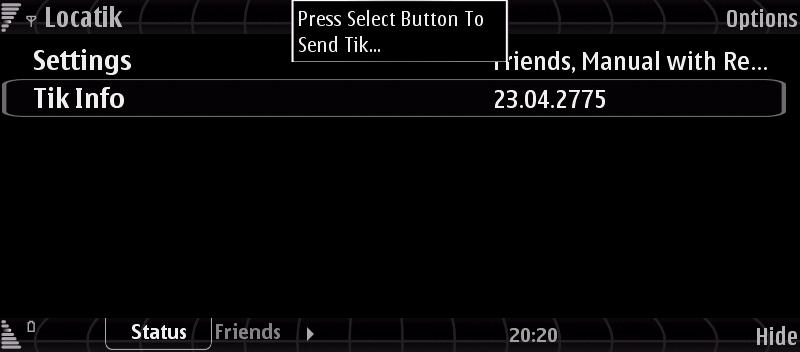
The phone application sends your current position to Locatik servers (in the form of tiny reports called Tiks) however only when you want it to do so...
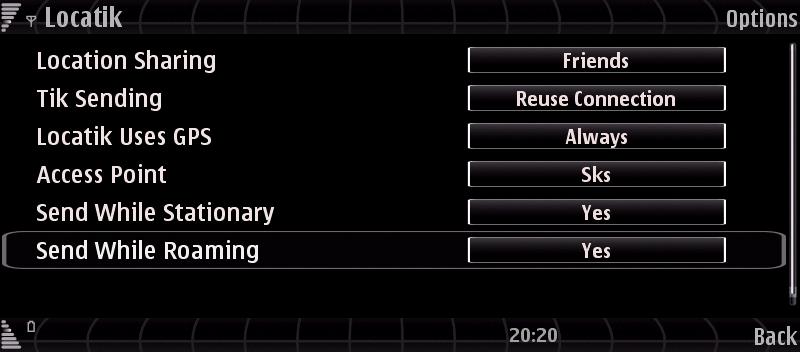
Also, it supports two ways of determining your current location:
+ Internal or external bluetooth GPS receiver
+ GSM cellular tower id: Utilizes complex mathematical algorithms to aid in determining your position based on previous appearances of GPS devices in your area. The more of them passed in your vicinity in the past, the more accurate your results will be.
Therefore there are a number of modes of sharing your location information:
+ Public Mode: When you’re in Public mode everyone can go to www.locatik.com and (knowing your username) can see where you were at the moment of sending the last report.
+ Friends Mode: When you set the Location Sharing to Friends on your phone, the next report you send will only be visible to the people you have on your Friends List on the web site.
+ Off: When chosen this option completely turns off part of the application responsible for collecting information on your location
To signup for the beta, visit locatik.com. Then you can download the mobile application from m.locatik.com through your cell phone browser.
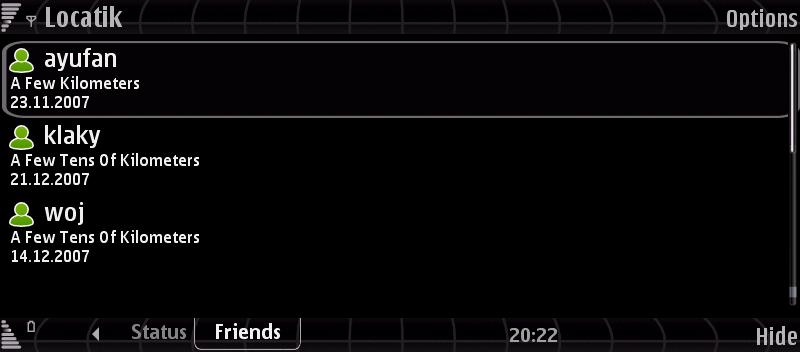
More info to be found directly in official site ;)
The phone application sends your current position to Locatik servers (in the form of tiny reports called Tiks) however only when you want it to do so...
Also, it supports two ways of determining your current location:
+ Internal or external bluetooth GPS receiver
+ GSM cellular tower id: Utilizes complex mathematical algorithms to aid in determining your position based on previous appearances of GPS devices in your area. The more of them passed in your vicinity in the past, the more accurate your results will be.
Therefore there are a number of modes of sharing your location information:
+ Public Mode: When you’re in Public mode everyone can go to www.locatik.com and (knowing your username) can see where you were at the moment of sending the last report.
+ Friends Mode: When you set the Location Sharing to Friends on your phone, the next report you send will only be visible to the people you have on your Friends List on the web site.
+ Off: When chosen this option completely turns off part of the application responsible for collecting information on your location
To signup for the beta, visit locatik.com. Then you can download the mobile application from m.locatik.com through your cell phone browser.
More info to be found directly in official site ;)
irRemote Development Challenges !
Monday, November 26, 2007
Two years have passed since irRemote was last seen on S60 2nd edition. Since then irRemote was one of the most awaited applications for S60 3rd edition. The biggest problem in developing the application for the new S60, were the changes in the security architecture of Symbian OS as well as in the handling of the infra-red port. The infra-red port was the main delaying factor in the development and market release of the application. In order to send proper IR codes the psiloc team had to access the hardware driver. Only this enabled them to send IR codes using the infra-red port with acceptable time tolerance and with the signal as verbatim as the original remote control. Another problem they faced, was the poor resolution of the system timer. This in turn stood in the way of sending well calibrated IR signals. That's why we had to manually determine the exact time...
They knew very well that the biggest disadvantage of the previous irRemote was the non-modifiable bundled remotes database that came with the application. they thus decided to take on the popular community approach this time. Now anyone can easily upload remotes to their database using a simple and intuitive wizard. What's more, by rating the remotes all irRemote users can now decide which remotes to make a go for. This proved to be just what the users wanted and the numbers speak for themselves, over 500 different devices were uploaded in the first week of the public tests!
You can read more over here ;)
They knew very well that the biggest disadvantage of the previous irRemote was the non-modifiable bundled remotes database that came with the application. they thus decided to take on the popular community approach this time. Now anyone can easily upload remotes to their database using a simple and intuitive wizard. What's more, by rating the remotes all irRemote users can now decide which remotes to make a go for. This proved to be just what the users wanted and the numbers speak for themselves, over 500 different devices were uploaded in the first week of the public tests!
You can read more over here ;)
Reader questions! : Recommended and most used softwares?
Thursday, June 28, 2007
 I've been asked many times from various forums members to give their a list of necessary or recommended third party software (that i use), well i'll try to give my own list, keep in your mind that this is subjective opinion as it might varies from one to other user according to the use of their smartphone ;)
For applications i use permanently :
* x-plore
* handy taskman
* handy blacklist
* handy safe
* handy clock
* handy expenses
* handy Weather
* bestmessage storer
* best profiles
* best keylocker
* lcg jukebox
* smartmovie
* office suite
* mobile webserver
* nokia (smart2go) gps software
* windows live messenger
* nokia podcasting software
* shozu
* fring
* gizmo
* imageexpo
* salling clicker
* symSMB 2.00
* Phone Guardian v2.00
* screenshot
* remindme
* search
* resconews
* pdf+
* coolsms+
* rotateme (for my N80 but not for my N95)
* timebar
* animated sms
* Projekt
* Google Maps
* Nstarter
* sport tracker
* im+
* vnc+
* PowerBoot
* PhotoNova and PhotoWings
* TextQuick
* minigps
* totalrecall
* psiloc gsync
* yoyap
* mail space
For games i play daily :
* slide a lama (java)
* flexis extreme (java)
* Frozen Bubble (java)
* asphalt 3d (sisx)
* brothers in arms 3d (sisx)
* fifa 2007 (sisx)
* Project Gotham Racing Mobile (sisx)
* tombraider legend 3d (sisx)
* virtual pool (sisx)
* global race (sis)
So, i hope it will a little helps you :) ;)
Subscribe to:
 Posts (Atom)
Posts (Atom)