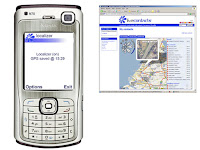
 Localizer
 is a GSM / GPS enabled service that brings you an array of features you can’t find anywhere else. Know where you are:
* Find who is nearby
* Get where you are going
* Share your location along the way
* Stay connected with people you care about
GPS-enabled maps, directions, and points of interest. Let your friends and family know where you are. Livecontacts allows you to pinpoint your location and find out what's nearby. You can also share your location with trusted people, view your location history on an interactive map, manage your address book, or have information on your contact’s whereabouts in maps available. Monitor your contacts presence information and connect with people on the go using chat, SMS, IM, email or phone. Using the associated web site, you can allow other users to view your location on the Internet. Livecontacts is a downloadable application for your (GPS-enabled) smartphone. Livecontacts is targeted at individuals and closed groups with active lifestyles who have a need for greater location awareness and communication between trusted family, friends and colleagues.
Improvements since version 0.5:
- Support for the new Symbian S60 3rd Edition phones (N73, N76, etc.)
- Support for built in GPS (N95, 6110) in addition to Bluetooth GPS
- Reduced datatraffic for exchange of positioning information
- Not moving delay (no datatraffic when not moved)
- Start / stop button for GPS and exchange of data
- Warning messages when settings are changed
- Autostart when switching on phone
- Monitoring of operation (restart when shutdown because of unknown error)
- One button shutdown when red (disconnect) button is pushed
- Some technical improvements (memory leaks, multi phone support, technical connectivity)
- Symbian signed certification passed
This application allows you to share your location via the www.livecontacts.com website. The location can exist of either GPS coordinates (when a GPS is connected) or GSM cellid characteristics.
1) After installation, run the application. In the settings menu you will need to fill in an email and password (the ones you registered at the www.livecontacts.com website). If you exit the application, a message will be displayed to request you to fill these two fields in when left empty. The username is the emailadress you registered with at www.livecontacts.com. The password is the same password you choose as part of the registering process of www.livecontacts.com. The registration is for free. Use a regular internet PC to register.
2) Also an IAP (Internet Access Point) needs to be selected. The application will connect to the internet using the IAP you selected. It is required that a SIM is inserted that has access to mobile internet via your Telecom Provider.
3) When the main screen appears, use the Options / Settings menu to change the default preferences.
You can change following items:
- Position exchange on/off: to stop / start the communication process of position plots
- National interval: How often the mobile phone will communicate your position to the website
- International interval: Same as National interval, but for countries abroad (and also for 'strange' networks in your own country). This interval may be different because of the costs of roaming
- Not moving delay on/off: To limit the amount of data traffic, this setting will enable you to skip a number of times the exchange of positions when they were not changed. Minimum exchange is 1 plot per hour.
- Disconnect @ plot yes/no: Setting to maintain internet connection after the position (plot) was communicated or to disconnect the internet connection. Default setting: no. Changing this setting may result in unitisation of the amount of data communicated. A warning message is presented when leaving the settings menu with the disconnect option set to yes.
- Email: Email as registered with at www.livecontacts.com
- Password: Password as registered at www.livecontacts.com
4) In the options menu you can start / stop a GPS. Automatically the application checks whether you have a Bluetooth GPS or built in GPS (N95, 6110 Navigator, etc.). When you want to change your GPS, you need to remove the old GPS from the list of paired Bluetooth devices. This is done in the menu of the phone itself and not in the Localizer application. You can stop / start the GPS. If the GPS is disconnected, automatically the application will try to disconnect according to a preset scheme.
5) In the options menu additional information is presented in About (version of the application) and Help (info@livecontacts.com for support.)
6) To exit the application, choose Minimize or Shutdown. Shutdown will completely stop the application and data exchange. Minimize will hide the application but your position will still be communicated in accordance with the set interval.
7) The application is automatically turned on when powering on the phone. The application is by default hidden. To start the application please go to the appropriate folder (application folder).
A selection of messages that can be displayed:
- Cell Saved @ 17:42 : No GPS coordinates are available, but the coordinates of the GSM Cellid your GSM is connected to are known. A GSM Cellid was communicated to the website successfully. The time displayed is UTC and is the time from the webserver.
- GPS Saved @ 17:42 : GPS coordinates and GSM Cellid were communicated to the website successfully. The time displayed is UTC and is the time from the webserver. Next time you do not have a GPS connected or no GPS fix is available, the coordinates of this cellid are used to localize your GSM when connected to this cell.
- Reconnect GPS @ 23 : No GPS is connected. A GPS is paired with the phone. The application will try to reconnected in 23 sec.
- Plotting @ 41 : A new location (GPS and/or GSM Cell) will be communicated to the central server in 41 sec.
8) When the application did not successfully communicate the position plot, it will automatically cancel the (opening of) the connection after 55 sec. to enable a new attempt to connect.
NB : Register for free at www.livecontacts.com to get your password.
Download it!



 Posts (Atom)


